
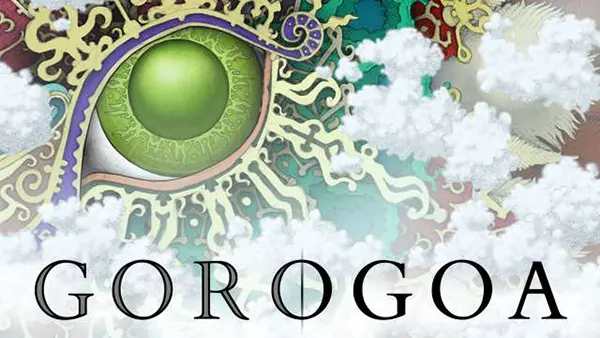
Gorogoa (Android/iOS): a puzzle story you read like an art book
Gorogoa is a rare kind of mobile game: it doesn’t try to impress with endless levels, timers, or daily chores. Instead, it asks for attention. You move hand-drawn panels around a simple 2×2 grid, and the “aha” moments come from noticing visual echoes—shapes, doors, windows, circles, frames—then making them line up in ways that feel like turning pages in a picture book. In 2026 it still stands out because the design is calm, precise, and built around observation rather than speed.
What Gorogoa is on mobile in 2026: background, availability, and what you actually buy
Gorogoa was created by Jason Roberts and published by Annapurna Interactive, with the original release landing on iOS on 14 December 2017, and the Android release arriving later (19 June 2018). The mobile editions are not “lite” versions; they are the full experience built around the same core interaction: rearranging illustrated panels and drilling into them as if each image has layers. The music is credited to Joel Corelitz, and the game was built in Unity—details that matter mostly because they explain why it ports cleanly across devices and still feels modern years after launch.
On both iOS and Android, Gorogoa is typically sold as a paid download rather than a free-to-start product. Prices vary by region, but $4.99 is a common reference point on Google Play, and the iOS listing also shows it as a paid app (with pricing depending on the store country). In practical terms, this means your relationship with the game is straightforward: you pay once, then you focus on the puzzles without the design pressure that usually comes with constant upsells.
Compatibility is part of the “is it still worth it?” question in 2026. Apple’s listing indicates the iOS version supports relatively old devices too (for example, it lists a requirement of iOS 9.0 or later on the UK App Store page), which is unusually forgiving for a premium title. On Android, the Google Play listing remains active and shows the app has been maintained with updates (it lists an update date of 23 May 2024), so the game isn’t stuck in a forgotten state—it’s simply stable, finished, and not dependent on seasonal content.
What “reading it like an art book” really means in play
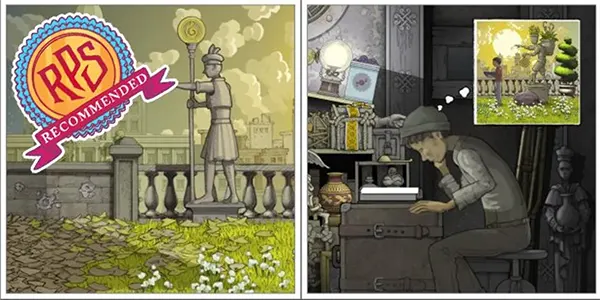
People call Gorogoa “art-book-like” because progress often comes from studying composition rather than decoding rules. A panel might show a landscape, a building façade, or a small object in someone’s hands, and your job is to treat that drawing as a space you can enter. When you zoom in, the illustration can become a different scene; when you slide one panel onto another, a detail from one image can behave like a doorway into the next.
Unlike many mobile puzzle games, the story isn’t delivered through paragraphs of text. It’s communicated through repetition and transformation: a motif appears in one setting, then returns in another, altered by time, memory, or conflict. You follow a boy through changing environments, and the narrative tone is intentionally symbolic—clear enough to feel coherent, open enough that two players can talk about what they think it “means” without one of them being wrong.
This also explains why the pacing feels closer to browsing an illustrated book than grinding levels. You might solve several interactions quickly, then slow down for a single stubborn transition. The game rewards a quiet kind of persistence: not brute forcing, but looking again and asking, “What here could be moved, opened, aligned, or reframed?” When it clicks, it doesn’t feel like you found the hidden answer; it feels like you finally noticed what the drawing was offering.
How the 2×2 panel puzzle system works on a phone
The basic layout is always readable: four panels on screen, arranged in a 2×2 grid. You can drag panels to swap positions, stack one over another, and tap or pinch to zoom into an image. That zoom is not just magnification—often it’s a transition into a deeper “layer” of the illustration, where an object becomes an environment, or a framed detail becomes the next room you need.
The signature mechanic is how panels can interact through alignment. A circular opening in one panel might match a circular object in another; a window might become a frame that fits over a different scene; a doorway cut-out can be dragged like a physical piece and placed on top of another panel to create a path. The rules are visual, not verbal: the game rarely tells you what to do, but it consistently teaches you how to think by letting you test a small action and immediately see whether it produces a meaningful change.
On touchscreens, this interface is a natural fit because the actions mirror what you would do with paper: slide, overlay, zoom in to inspect, then pull back to see the whole composition. It also means Gorogoa is less about dexterity and more about attention. If you can comfortably pinch-zoom and drag tiles, you can play it. There are no time limits forcing fast input, so the design remains accessible even when a puzzle is conceptually demanding.
A practical way to get unstuck without spoiling the game
When you hit a wall, start by treating each panel as a “container” that may hide a second scene. Zoom into every panel slowly and look for edges that behave like frames: picture borders, windows, keyholes, circular ornaments, pages, or architectural cut-outs. Gorogoa often uses these shapes as connectors. If something looks like it could be an opening, it usually is—either literally, or as a hint that you should align it with a matching shape elsewhere.
Next, try the “overlay test”: drag a panel over another and watch for a subtle snap or transformation. The game’s logic is generous—if two images are meant to connect, you’ll usually feel it because the alignment looks clean and intentional. If the overlap looks messy or random, it’s likely not the route. This is a reliable method because Gorogoa’s art is carefully composed; successful solutions tend to look aesthetically “right,” not merely functional.
Finally, track recurring motifs rather than isolated objects. If a symbol appears—an eye, a fruit, a wheel-like shape, a statue, a mechanical element—assume it will return. Gorogoa is built on visual callbacks. Sometimes the answer is not “find a new thing,” but “recognise the same thing in a different context” and then use the panel system to bridge those contexts. This keeps your problem-solving grounded in observation instead of trial-and-error chaos.
Who Gorogoa suits best, and how to approach it as a mobile experience
Gorogoa is ideal for players who enjoy puzzles that feel tactile and visual rather than mathematical. If you like games where your main tool is attention—spotting parallels, following visual logic, noticing when an image is “asking” to be reframed—this one lands perfectly. If you prefer long sessions with constant rewards, it may feel short and quiet, because its satisfaction comes from a handful of beautifully designed breakthroughs rather than a steady stream of points and unlocks.
It’s also a strong choice for people who want a story without heavy reading. The narrative is communicated through images and transitions, so it works well across languages and doesn’t rely on dialogue. That matters on mobile, where play sessions are often broken into short bursts. You can solve a couple of interactions, leave, and come back without forgetting a plot summary—because the story is tied to what you see and do, not what you memorise from text.
In 2026, another practical advantage is that it isn’t built around live events or social mechanics. It’s a complete, authored work. The Google Play listing still shows it as a purchasable title and indicates it has been updated in the past few years, which helps reassure buyers that it hasn’t been abandoned to compatibility problems. On iOS, the compatibility information suggests it supports older versions of the operating system than many modern releases, which is useful if you keep an older device for travel or offline play.
How to get the best experience: small habits that make a big difference
Play with sound at least part of the time. The music isn’t there to push intensity; it supports the reflective tone and helps the transitions feel purposeful. On a phone, where distractions are constant, audio can act like a gentle anchor that keeps you focused on the images long enough to notice the details that matter.
Don’t rush the early puzzles. The first sections are doing more than teaching controls—they’re teaching a way of thinking: “Images are spaces, frames are tools, and alignment is language.” If you treat the opening as a tutorial to skip through, later puzzles can feel abrupt. If you treat it as the game quietly training your eyes, the mid-game flows more naturally.
If you’re choosing between Android and iOS, base the decision on where you prefer premium games and how you manage purchases. Both stores list it as a paid download, and prices can vary by region; what matters more is whether you like your library on the App Store or Google Play. Either way, the core appeal remains the same: a hand-drawn puzzle narrative that respects your time and rewards careful looking.
Game Bestsellers
-
 Call of Duty: Warzone Mobile Performance Analysis Across Modern Dev...
Call of Duty: Warzone Mobile has become one of the …
-
 Squid Game: Unleashed — A Mobile Battle-Royale Inspired by the Hit ...
Squid Game: Unleashed is one of the most anticipated mobile …
-
 Assassin’s Creed Jade — A New Chapter in the Assassin’s Universe
Assassin’s Creed Jade marks an important step for Ubisoft as …