
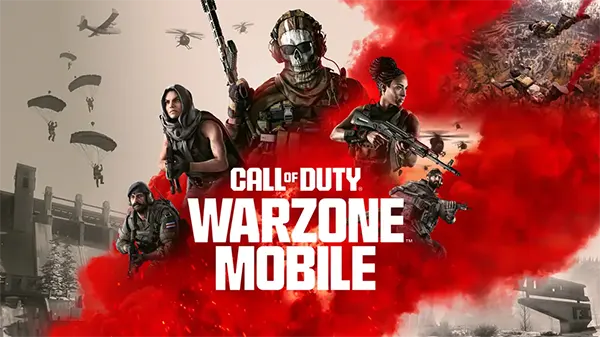
Call of Duty: Warzone Mobile Performance Analysis Across Modern Devices
Call of Duty: Warzone Mobile has become one of the most technically demanding shooters available on smartphones. Built on the same core engine principles as its console and PC counterparts, the mobile version pushes hardware limits through large-scale maps, real-time physics, advanced lighting, and a high number of simultaneous players. Performance varies significantly depending on device class, chipset generation, thermal management, and operating system optimisation.
Core Performance Characteristics of Warzone Mobile
At its foundation, Warzone Mobile relies on a heavily modified version of the IW engine adapted for ARM-based processors. The game prioritises draw distance, player visibility, and stable frame delivery over visual excess, yet still demands sustained GPU throughput. Unlike many mobile shooters, it avoids aggressive dynamic resolution scaling, which places additional strain on mid-range devices.
CPU load is consistently high during active matches, particularly in urban zones with multiple players, vehicles, and destructible elements. Devices with weaker big-core performance often experience frame pacing issues rather than outright frame drops, resulting in perceived stutter even when average FPS appears acceptable.
Memory bandwidth also plays a crucial role. Devices with slower LPDDR4X memory tend to show longer asset streaming delays, especially during parachute deployment and rapid traversal. This can lead to texture pop-in and delayed environmental loading on older hardware.
Graphics Settings and Their Real Impact on FPS
Warzone Mobile offers limited but meaningful graphical controls, including visual quality presets, shadow resolution, and motion blur toggles. Reducing shadow quality provides the most immediate performance gain, particularly on devices using Mali GPUs, where real-time shadows are computationally expensive.
Texture quality has a smaller impact on frame rate but directly affects memory usage. On devices with 6 GB of RAM or less, high textures can trigger background process eviction, increasing the risk of sudden performance degradation during longer sessions.
Motion blur, while visually subtle, introduces additional post-processing overhead. Disabling it not only improves clarity during fast-paced gunfights but also stabilises frame times on mid-tier chipsets.
Performance on High-End and Flagship Smartphones
Flagship devices released from late 2023 onwards handle Warzone Mobile with relative ease. Chipsets such as Snapdragon 8 Gen 2, Snapdragon 8 Gen 3, and Apple A17 Pro maintain stable performance even at high graphical presets. Sustained frame rates between 90 and 120 FPS are achievable on supported displays.
Thermal design becomes the limiting factor rather than raw processing power. Prolonged sessions exceeding 25–30 minutes can lead to moderate thermal throttling, particularly on slim chassis designs without active cooling. Even then, frame rate reductions are gradual rather than abrupt.
Storage speed also influences initial load times and in-match asset streaming. UFS 4.0-equipped devices demonstrate noticeably faster map loading and fewer streaming interruptions compared to older UFS 3.1 storage solutions.
iOS vs Android Flagship Optimisation
On iOS, Warzone Mobile benefits from tighter hardware-software integration. Apple’s Metal API allows for more predictable GPU scheduling, resulting in smoother frame pacing even when average FPS matches Android counterparts.
Android flagships, however, often provide greater flexibility through higher refresh rate support and more granular system-level performance controls. Devices with gaming modes that lock CPU and GPU frequencies tend to maintain stability longer under sustained load.
Battery drain is higher on both platforms, but iOS devices typically exhibit more efficient power scaling. Android devices may consume power faster at peak performance but compensate through larger battery capacities in many models.
Mid-Range and Budget Device Performance Reality
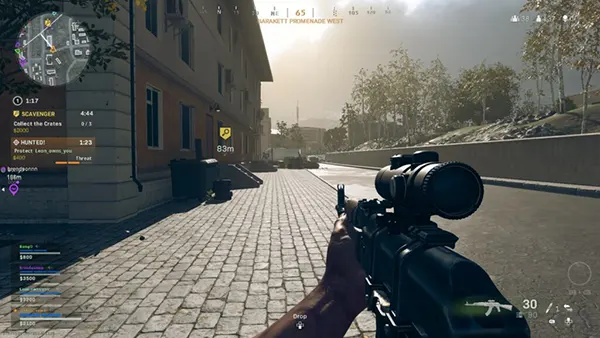
Mid-range devices present the widest variation in performance. Chipsets such as Snapdragon 7+ Gen 2 and Dimensity 8200 can deliver playable results, but only with adjusted settings. Expect frame rates between 45 and 60 FPS under stable conditions.
Budget devices struggle primarily due to GPU limitations rather than CPU constraints. Entry-level Mali and Adreno GPUs often fail to maintain consistent frame delivery during close-range combat or when multiple effects are rendered simultaneously.
Thermal throttling is more aggressive in this segment. Short sessions may appear smooth, but performance degradation becomes evident within 10–15 minutes, especially during summer conditions or while charging.
Practical Settings for Playability on Weaker Hardware
Lowering resolution scaling indirectly by selecting the lowest visual preset is the most effective adjustment. This reduces both GPU load and memory bandwidth usage without severely impacting gameplay readability.
Disabling background applications and system overlays helps preserve available RAM. On devices with 4–6 GB of memory, this can prevent sudden stutters caused by forced asset reloads.
Using wired internet connections or stable Wi-Fi reduces CPU overhead linked to network correction and packet loss, indirectly improving perceived smoothness during multiplayer engagements.
Game Bestsellers
-
Call of Duty: Warzone Mobile Performance Analysis Across Modern Dev...
Call of Duty: Warzone Mobile has become one of the …
-
 Squid Game: Unleashed — A Mobile Battle-Royale Inspired by the Hit ...
Squid Game: Unleashed is one of the most anticipated mobile …
-
 Assassin’s Creed Jade — A New Chapter in the Assassin’s Universe
Assassin’s Creed Jade marks an important step for Ubisoft as …